
Own the Map Around Your Shop: A Practical Guide to GeoSpaces
How a local business can claim its corner of the real-world map, step by step, and where it leads for loyalty and games
Mark Vernon · VTC · 11/21/2026
Picture any neighbourhood corner: a bakery, a hardware store and a café that seems to have been there forever. Every one of them is on Google Maps, of course. But none of them really owns anything on the map. They have a pin, the same kind of pin as everyone else, sitting on a map that belongs to someone else.
That thought is a big part of why we built GeoSpaces. It lets you claim a real piece of the map, as a digital plot you hold in your own VTC account, and then use it for things that matter to a local business: being found, rewarding regulars, and, soon, connecting your place to coupons, stamps and games.
This is a practical guide. I'll explain what a plot actually is (and what it isn't), walk through claiming your first one, and share a few honest ideas for what a shop, café or studio can do with it.
What a GeoSpaces plot actually is
GeoSpaces lays a grid of small hexagons over the whole world map. It uses a system called H3, and each hexagon averages about 44 square metres, a little more or less depending on where you are on the globe. That's about the size of a small shop floor.
A plot is a centre hexagon plus up to 10 rings of hexagons around it. With no rings you hold a single hex. With all 10 rings you hold 331 hexes, roughly a hectare or more depending on where you are. Most businesses will want something in between: their front door and the pavement around it, or a block-sized patch that covers the whole storefront.
A few things are worth knowing up front:
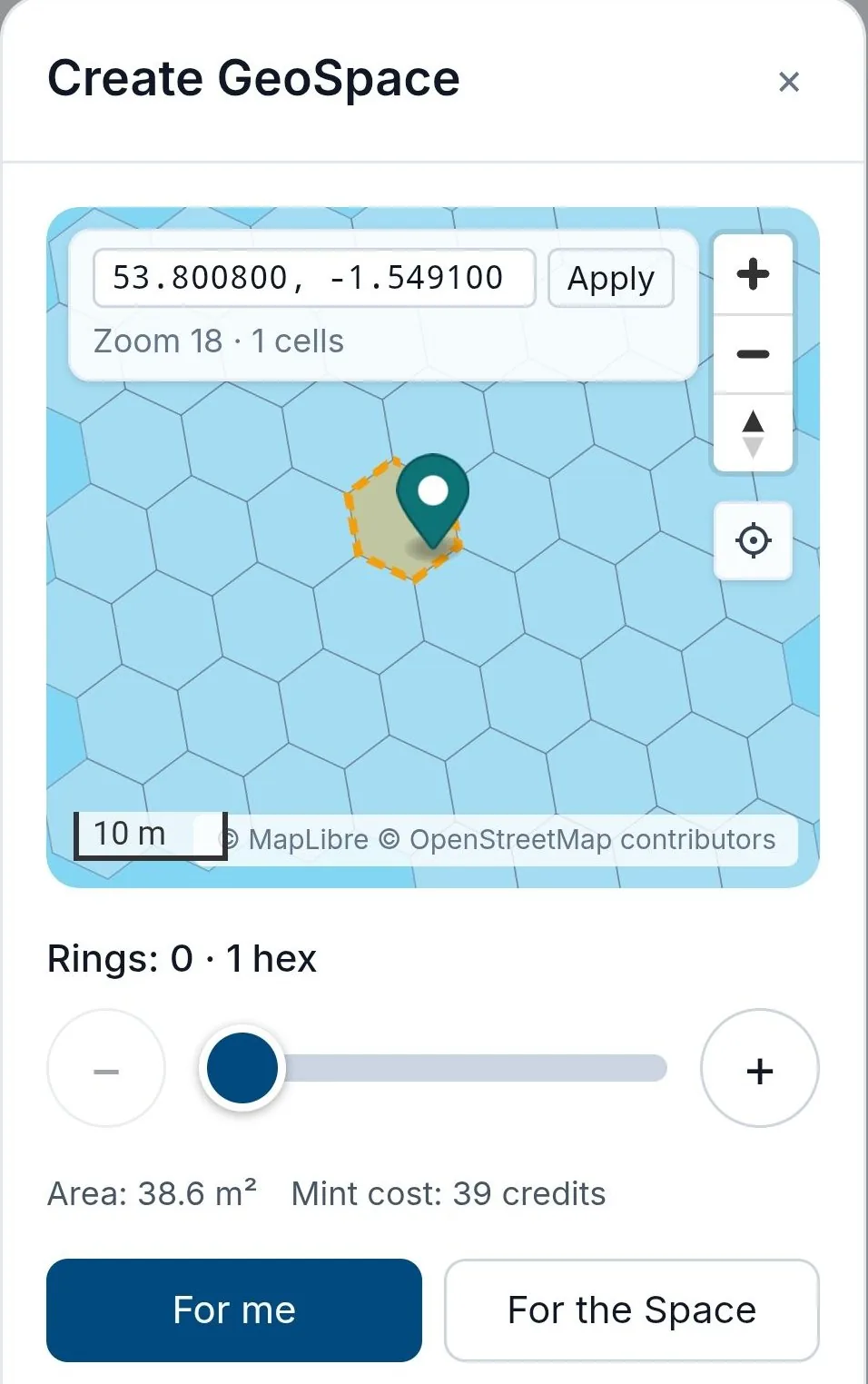
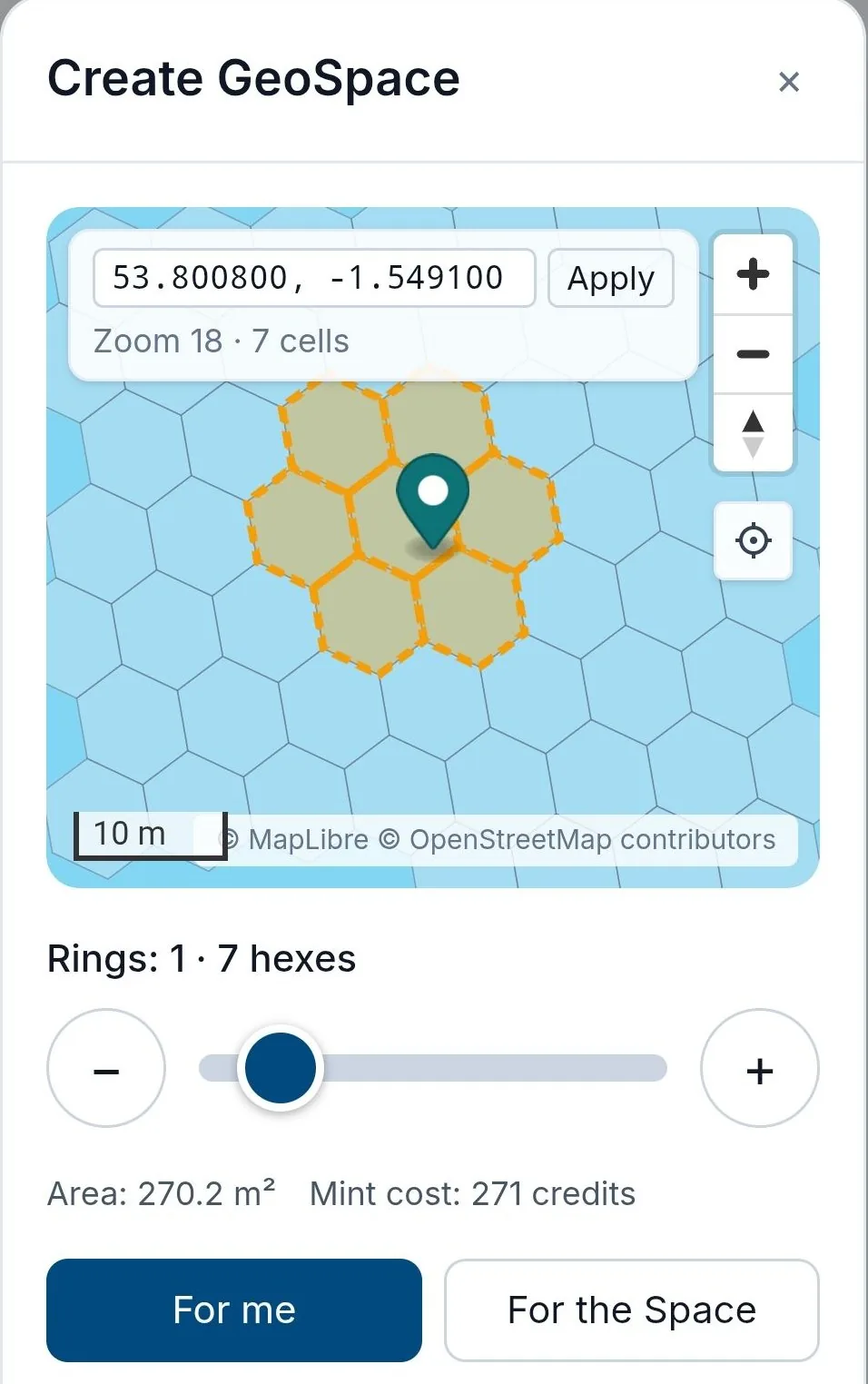
You pay by real area. A plot costs roughly 1 credit per square metre of the actual hexagon area. As an example from one spot in a city centre: a single hex (0 rings) came to 38.6 m² and a mint cost of 39 credits, and the centre hex plus one ring, seven hexes, came to 270.2 m² for 271 credits. Those figures are for that one spot. Hex sizes vary a little by location, so a café on a busy corner somewhere else will see slightly different numbers, and the app always shows you the exact area and mint cost before you confirm.
The grid covers everything. The hexagons cover the whole map, so a plot is simply a set of hexes, not a property lot. Once hexes are part of someone's plot, they're reserved to that plot.
Each plot is a token on the VTC ledger. When you buy a plot, it's minted as an ERC721 token (a standard type of digital ownership record) and held in your account.
It's a digital plot, not land. Owning the hexes over your shop doesn't give you any legal rights to the building, the pavement or anything physical. It's your place on a shared digital map.
Credits stay on VTC. Credits are VTC's closed-loop wallet. You spend them on VTC apps and services, not anywhere else.
I want to be clear about one more thing, because the word "marketplace" tends to get people excited. A plot is not an investment, and nobody should buy one expecting it to grow in value. Buy it because it's useful to you and your customers.
Step by step: claiming your first plot
Here's how it works today.
1. Open GeoSpaces. Go to geospaces.apps.vtc.com and sign in with your VTC account. If you run a VTC Space, you can also install GeoSpaces there, so it sits alongside your other apps. The app works in English, Spanish and Portuguese.
2. Find your place. Type your address into the search. GeoSpaces uses OpenStreetMap to find it and centres the map there. You'll see the hexagon grid laid over the streets around you.
3. Pick your centre and rings. Choose the hexagon at the heart of your plot, ideally your front door, then decide how many rings to add. Each ring you add shows the new area and the credit price before you commit, so you can try a few sizes and see how they look on the map.
4. Name it and choose who sees it. Give the plot a name customers will recognise, like "Panadería Lola" rather than "Plot 1". You can make it public, private or unlisted. For a business, public is usually the point.
5. Confirm and buy. GeoSpaces gives you the exact area and credit quote and asks you to confirm. Once you do, the hexes are reserved, the credits are charged and your plot is minted to your account.
6. Check it in the real world. Every plot has an Open in Maps link that opens the location in Google Maps. It's a quick way to check that your hexes cover the right corner.
If you're a Space owner or admin, the create screen gives you two options, For me or For the Space, so you can buy a plot for yourself or on behalf of the Space. That suits a business where the plot should belong to the team rather than one person.
You don't have to click through the screens either. GeoSpaces publishes its actions to VTC's AI tools, so you can ask for things like "find plots for sale near my address" or "create a plot here with two rings". You still see the quote and confirm before anything is bought.
What a local business can do with it
This is where it gets interesting. Here's an illustrative scenario (not a real customer) to make it concrete.
Lola runs a small bakery. She claims a plot with two rings, covering her shop and the corner outside, and names it after the bakery. She installs GeoSpaces in her bakery's VTC Space, where her regulars already follow her daily specials, and posts the plot so members can see "our corner" on the map. When a friend opens a second bakery across town, Lola gifts her a starter plot nearby as an opening present.
None of that needs anything that isn't live today. And a few ideas follow naturally from it:
Make your place recognisable. A named plot is a simple, visual way to say "this corner is ours" to your community.
Give your Space a map. If you run a VTC Space for your customers, adding GeoSpaces gives members a shared map of the places that matter to your community.
Gift plots. You can transfer a plot to another VTC user for a fee of 10% of its original price (just not to yourself). It makes a nice welcome gift for a partner business or a loyal customer.
Change your mind cleanly. If you no longer need a plot, you can list it on the marketplace for credits or sell it back to VTC. Each resale carries a 10% platform fee.
Where this is heading for loyalty and games
Here's what we're building next. None of it is available yet, so treat it as direction, not a feature list.
A shared location service for VTC apps. Any VTC app will be able to attach plots to its items and look up what's at a location. The first apps to use it will be Stamps and Coupons. Think of a coupon tied to your plot, or a stamp card that knows it was collected at your shop.
Opt-in location alerts. Customers who choose to will get a notification when they enter a plot. "You're near Lola's, today's special is medialunas" is the kind of thing we have in mind, and only for people who asked for it.
HexWorld. A mobile multiplayer game built on GeoSpaces, using the same hexes and places. For a business, that means your real corner could also be a place in a game your customers play.
That last idea excites me most. The same plot you claim today for your shop could, later on, be a coupon spot, a loyalty stamp and a place in a game, all on one map.
Earning as a Space owner
One detail matters if you run a community. When members buy plots through GeoSpaces installed in your Space, you as the Space owner earn a 20% referral. A neighbourhood group, a business association or a local club that helps its members claim their corners gets something back for organising it.
If you're weighing up what a Space costs to run in the first place, I wrote about why per-member fees hurt community budgets. For the bigger picture of how local businesses use VTC, see VTC for small teams, coworking and local businesses.
Start with your own front door
My advice is to start small. Claim a single hex or one ring around your front door, name it well and see how your customers react. You'll learn more from one real plot than from planning a whole block.
Open GeoSpaces, search for your address and see what your corner looks like on the hex map. If you don't have a VTC account yet, you can create one at vtc.com.